In this blog post, we’ll walk through a Rust project that scrapes comics from the SMBC Comics website, caches the images, and allows for efficient reuse of previously downloaded images. This solution demonstrates how to use the reqwest and scraper crates to handle HTTP requests and parse HTML, along with basic caching techniques to avoid redundant network calls.
Overview of the Project
This Rust project scrapes a set number of comic images, downloads them if not previously cached, and stores them locally for future use. The goal is to download 15 comics with an adjustable sleep time between requests, and store the downloaded images in cache files for efficiency. Let’s break down how this is done, piece by piece.
Key Libraries Used
reqwest– A simple HTTP client for making requests.scraper– A Rust crate to parse HTML and extract content using CSS selectors.tokio– For asynchronous runtime to handle the network requests concurrently.std– For file operations and threading.
The Code Structure
Let’s walk through the code, which consists of several functions that work together to achieve our goal.
1. Helper Functions
First, let’s discuss the helper functions that deal with file handling and caching.
sleep(m: u64)
This function introduces a delay to prevent making requests too quickly, which could lead to throttling or blocking by the website.
rustCopyEditfn sleep(m: u64) {
    let sleep_time = time::Duration::from_millis(m);
    thread::sleep(sleep_time);
}
create_cache(count: u64)
This function creates a folder (cache/) if it doesn’t already exist, and generates a path for storing the comic images as HTML files.
rustCopyEditfn create_cache(count: u64) -> PathBuf {
    let mut path = PathBuf::from("./cache");
    if !path.exists() {
        fs::create_dir(&path).expect("Failed to create directory 'cache'");
    }
    path.push(format!("{}.html", count));

    path
}
append_to_cache(count: u64, item: String)
If a comic is downloaded for the first time, this function appends the comic image URL to the cache file for that comic count.
rustCopyEditfn append_to_cache(count: u64, item: String) {
    let path: PathBuf = create_cache(count);

    let mut file = OpenOptions::new()
        .append(true)
        .create(true)
        .open(&path)
        .expect("Failed to open html file for appending");

    writeln!(file, "{}", item).expect("Failed to write to html file");
}
get_cache(count: u64)
Before downloading a new comic, this function checks if it’s already cached. If a cached version is found, it returns the comic’s URL.
rustCopyEditfn get_cache(count: u64) -> String {
    let path = PathBuf::from(format!("./cache/{}.html", count));

    if path.exists() {
        let file = OpenOptions::new()
            .read(true)
            .open(&path)
            .expect("Failed to open cache.html for reading");

        let reader = BufReader::new(file);

        for line in reader.lines() {
            match line {
                Ok(comic) => return comic,
                Err(e) => println!("Failed to read line: {}", e),
            }
        }
    }
    "no comic found".to_string()
}
2. Web Scraping Functions
Now, let’s focus on the parts that interact with the website and extract the comic image URL.
parse_html(url: &str)
This asynchronous function uses the reqwest crate to fetch the HTML content of a URL.
rustCopyEditasync fn parse_html(url: &str) -> Html {
    let html = reqwest::get(url)
        .await
        .expect("Failed to get response.")
        .text()
        .await
        .expect("Failed to convert response into text.");

    Html::parse_document(&html)
}
get_comic_img(html: &Html)
Using the scraper crate, this function extracts the comic image URL from the HTML. It uses the img#cc-comic CSS selector to find the image element.
rustCopyEditfn get_comic_img(html: &Html) -> String {
    let selector = Selector::parse("img#cc-comic").unwrap();
    for element in html.select(&selector) {
        if let Some(src) = element.value().attr("src") {
            return src.to_string();
        }
    }
    "no comic img".to_string()
}
3. Main Logic: Downloading and Caching Comics
The main function coordinates the scraping process. It checks the cache, downloads new comics if necessary, and updates the cache.
rustCopyEdit#[tokio::main]
async fn main() -> Result<(), reqwest::Error> {
    const AMOUNT: u64 = 15; // Number of comics to scrape
    const SLEEP: u64 = 250; // Sleep duration in milliseconds
    let mut url = String::from("https://www.smbc-comics.com/comic/wishes-6");

    for i in 1..=AMOUNT {
        println!("count: {}", i);

        let cached = get_cache(i);
        let comic_img = if cached == "no comic found" {
            sleep(SLEEP);
            let html = parse_html(&url).await;
            let img = get_comic_img(&html);
            append_to_cache(i, img.clone());

            // Update the URL for the previous comic
            let selector = Selector::parse("a.cc-prev").unwrap();
            for element in html.select(&selector) {
                if let Some(href) = element.value().attr("href") {
                    url = format!("{}", href);
                    break;
                }
            }

            img
        } else {
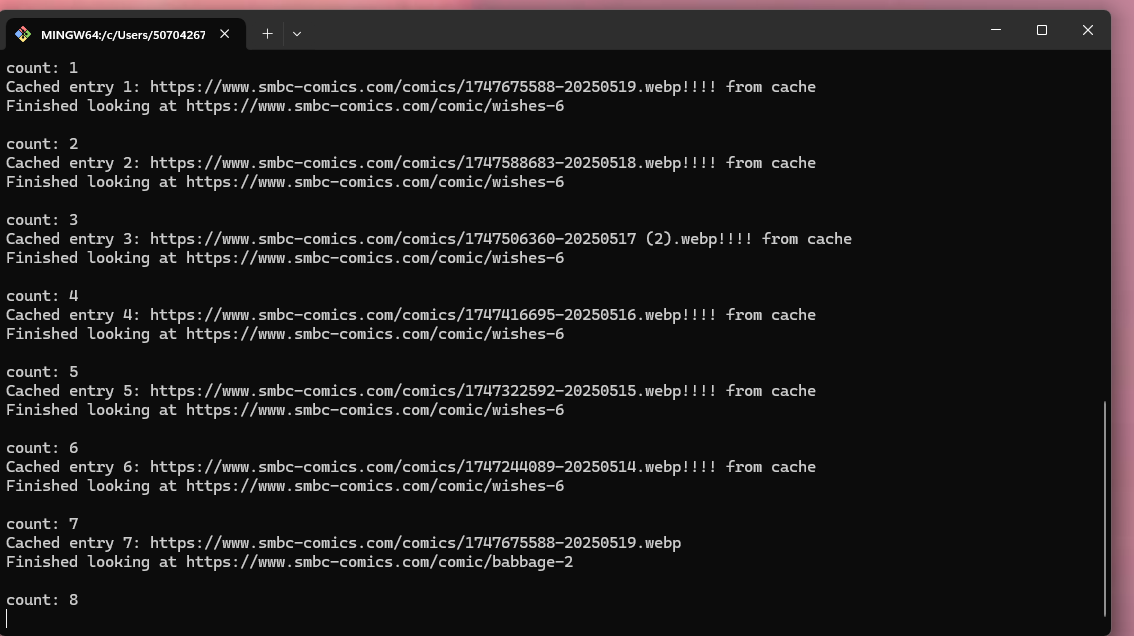
            cached + "!!!! from cache"
        };

        println!("Cached entry {}: {}", i, comic_img);
        println!("Finished looking at {}\n", url);
    }

    Ok(())
}
How It Works
- Initial Setup: The program starts by setting the initial URL of the comic and the number of comics to fetch (
AMOUNT). - Caching Check: For each comic, the program first checks if it is available in the cache. If it is, it uses the cached version; otherwise, it fetches the comic image from the website.
- Download and Parse: If the comic image is not cached, the program sends an HTTP request to the comic’s URL, parses the HTML, extracts the image URL, and stores it in a cache file.
- Navigate to Previous Comic: After each comic, the program navigates to the previous comic using the “Previous” link on the page.
Final Thoughts
This project is a great starting point for building your own web scraping tools in Rust. It combines efficient caching with asynchronous web requests, which allows you to download multiple comics in a relatively short amount of time without hitting the server too hard. By leveraging Rust’s concurrency model with tokio, this scraper can scale to handle more comics or even handle multiple websites.
Always remember to be respectful when scraping websites—avoid overloading servers and abide by the website’s terms of service.

Leave a Reply